

They say that perfect is the enemy of good, but today’s OLED panels reach so close to perfection that sticking with “good enough” feels a bit too much like settling. Traditional LCD monitors can be quite good, but OLED panels give you contrast, color depth, and motion clarity that humbles most any LCD out there. Even after just a few hours in front of an OLED monitor, it’s hard to go back.
But OLED isn’t one thing. A 480Hz panel tuned to keep you ahead in a ranked match serves a very different user base than a studio-ready 27-inch panel with 12G-SDI input, and both differ widely once again from the OLED monitor that you’d pack up for a business trip. And many people need a monitor that excels in multiple worlds, like a model that games hard on a Friday night while still allowing for client-ready deliverables on a Tuesday morning. All these considerations matter, so picking the right panel requires an appraisal of your most common use cases, the environment that your monitor will live in, and the experience that you need your new monitor to provide.
That’s what this guide is for. It walks through all the ways to go OLED, from the 27-inch panels that define the competitive gaming scene to the 4K workhorses that do a little of everything, from the panels built for color-critical work to the ones built to move. As the world’s #1 OLED monitor brand, we give you lots of options. Let’s find the right one for you.

What do you need the panel for?
Before you start comparing specific monitors, start by setting some goals. The lanes below determine your starting point for almost everything else in this guide, as they establish what specifications will be most meaningful to you on an everyday basis.
- You’re chasing frames. If you’re looking for a gaming monitor, you’re in the right place. We cover your best OLED gaming monitor options in a variety of categories. We have models fine-tuned for competitive esports, others that amp up your immersion, displays that are a perfect match for your console, and a range of all-around excellent OLED monitors ready for mainstream gamers.
- You require professional-grade color accuracy. If you grade, edit, design, or if you put a premium on experiencing games and media just as their designers intended, the creator lane is where you’ll find the professional-grade monitors with the specs and features you need.
- You need a screen that’s ready to move. If you need a second display on a plane, at a café, or at a client’s desk, check out our list of portable monitors. They’re slim enough to fit in a laptop bag, easy to connect to a wide range of devices, and you can get all that convenience and portability alongside the premium display quality of an OLED panel.
If your needs for an OLED monitor cover more than one category, don’t worry. In this list, you’ll find speedy gaming monitors with super-crisp resolutions and professional-grade color accuracy. The same is true on the other side: there are options for creators that back their play with elevated refresh rates, too.
An OLED monitor you don’t have to worry about
Perhaps you’ve held off on purchasing your first OLED monitor due to concerns about burn-in. We’ve put in extensive work to put this problem to rest, but it’s a fair one, and it deserves a straight answer.
Burn-in is a risk that comes with OLED panel technology. When an OLED monitor doesn’t include proper safeguards and is subjected to a long-running torture test of bright, static images, burn-in can be the result. But panel and monitor manufacturers can do a lot more about burn-in than simply print a warning on the box. The ASUS OLED lineup offers a comprehensive suite of OLED protections that allow your monitor to manage its own longevity without requiring your constant attention.

First, some factors on the hardware side, starting with the latest panels. The basic structure of Tandem OLED tech mitigates the risk of burn-in right out of the gate, and we amplify that protection with robust cooling. Depending on the model you choose, you might see features like custom heatsinks, graphene film, or GaNFET tech. Many ASUS OLED monitors go a step further with a Neo Proximity Sensor, which notices when you leave your desk and switches the panel to a black screen. When you sit back down, your content pops right back up. This feature all but eliminates the possibility that your monitor will develop burn-in when you’re not even using it.

The second layer is ASUS OLED Care. This suite of technologies complements the hardware-level protections in a variety of ways:
- Pixel Cleaning recalibrates the screen when the monitor has been active for several hours. This process takes just a few minutes, and activates automatically when the monitor is turned off.
- Screen Move quietly shifts the image by a fraction over time, spreading use across pixels instead of concentrating it in one place.
- Logo Brightness Adjustment automatically detects static onscreen content like desktop icons and reduces their brightness.
- Taskbar detection dynamically detects the taskbar and reduces brightness around it to avoid burn-in.
- Boundary detection dynamically detects the boundary of the black bars and reduces the brightness and also slightly shifts the pixel of the near borders.
- Screen Saver automatically dims the screen after two minutes of inactivity.
Put all these elements together, and you have a monitor that shoulders the entire workload of mitigating the risk of burn-in. Within reason, you can simply game, create, and work without even worrying about burn-in. We’re so confident about that guarantee that we put it in writing: ASUS OLED monitors come with a 3-year warranty that explicitly covers panel burn-in.
An OLED panel type for any room
If you’ve ever had to squint at a too-dim smartphone screen in broad daylight to read a text message, or if you’ve ever scorched your retinas by turning on a too-bright smartphone screen late at night, you’ve encountered the reality that ambient lighting matters, and it matters a lot.
OLED displays live by that rule, too. Check out our detailed guides on display coatings and OLED panel types to dive deep into the subject. Here, we’ll give you some quick recommendations.

Start with bright rooms. Let’s say you typically sit by a window or in a space that stays lit all day, and you’d rather not hide behind blackout curtains. You’ll almost certainly want a monitor coating that helps suppress glare, and you’ll definitely want a monitor bright enough to compensate for the ambient light. In this scenario, the panels in this lineup with a higher average brightness do real work for you, as do their glossy, anti-glare surfaces. For bright rooms, we recommend a Tandem OLED panel with a TrueBlack Glossy or BlackShield coating, or a previous gen OLED monitor with a matte coating.

In some ways, dark rooms are friendlier environments for monitors. OLED panels dazzle in these environments, especially if you take advantage of their exceptional HDR capabilities. That’s why so many of our OLED monitor options have such robust HDR support, both in our gaming and creator lineups. But here’s the catch: in a dark room, you’re also more apt to notice subtle visual elements. Things like color gamut coverage and color volume all come under the microscope. For such environments, we often recommend QD-OLED panels. Their punchier colors elevate everything you do with your PC, and they might be essential for color-critical creative work.
If you have a reason for preferring a QD-OLED panel in a bright room, or a WOLED panel in a dark room, you do have options. The gap between Tandem RGB WOLED and Tandem RGB QD-OLED has closed significantly with all the latest panel improvements. While older QD-OLED panels can display a purplish tint under bright lights, the latest panels with our BlackShield Film diminish this effect significantly. The latest Tandem RGB WOLED panels remove the white subpixel to help reduce fringing artifacts around text and other UI elements, while also featuring more vibrant colors that aren’t washed out by the white subpixel.

It’s also quite possible that you don’t need to worry too much about the panel type of your OLED monitor. Many folks don’t use their PCs in the extremes of light or shadow. If you don’t need your monitor to handle those usage scenarios, you can feel good about reserving your budget for other considerations. Mainstream OLED monitors of any type will perform just fine in standard lighting.
The best OLED gaming monitors: the latest 27-inch displays from ROG
For many gamers, the sweet spot for a monitor is 27 inches. They’re big enough to fill the all-important focus center of your vision, yet compact enough to keep a competitive field of view, with real pixel density at either 1440p or 4K. Many of the most popular ROG OLED gaming monitors fit into the 27-inch category, and considering that ROG is the market leader for OLED gaming monitors that’s saying something.
Here’s a selection of our most recent options.
| Model | Panel | Resolution Refresh Rate | Best for |
|---|---|---|---|
| ROG Strix OLED XG27AQDMES | QD-OLED | 1440p @ 240Hz | Best 27-inch value |
| ROG Strix OLED XG27AQDMGR | WOLED TrueBlack Glossy | 1440p @ 240Hz | Best value 1440p for mixed lighting |
| ROG Strix OLED XG27AQDNG | QD-OLED | 1440p @ 360Hz | Best value high-refresh 1440p |
| ROG Strix OLED XG27AQWMG | Tandem WOLED TrueBlack Glossy | 1440p @ 280Hz | Best 1440p for a bright room Excellent longevity |
| ROG Strix OLED XG27UQDMS | Tandem QD-OLED | 4K @ 240Hz | Best value 4K for dark-room gaming |
| ROG Swift OLED PG27AQWP-W | Tandem WOLED TrueBlack Glossy | Dual Mode 1440p @540Hz HD @ 720Hz | Best for ultra-competitive FPS |
| ROG Swift OLED PG27UCWM | Tandem RGB WOLED TrueBlack Glossy | Dual Mode 4K @ 240Hz FHD @ 480Hz | Best overall 27-inch |
If you’re looking to get started with your first OLED gaming monitor and budget is a priority, look no further than the ROG Strix OLED XG27AQDMES. It’s currently the lowest-priced ROG OLED gaming monitor, but the only thing “budget” about this display is its price tag. Featuring a QD-OLED panel capable of a 240Hz refresh rate, this monitor gives you the signature OLED perfect blacks and the high color volume that quantum dots bring.
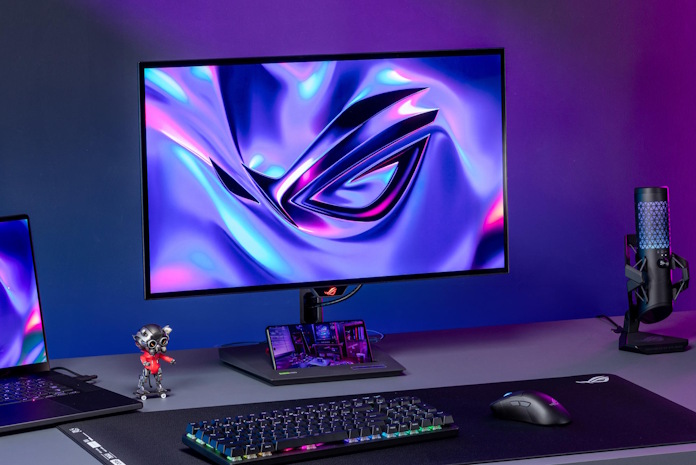
Two similarly priced ROG OLED monitors cater to gamers who need a little twist to the formula. For just a little more, you can upgrade to the ROG Strix OLED XG27AQDMGR and get bolstered color performance in mixed lighting environments thanks to the WOLED panel under a TrueBlack Glossy coating. Need a monitor with a bit more speed to keep up with your competitive ambitions? The ROG Strix OLED XG27AQDNG ups the ante to 360Hz. If you’re the player who notices the difference between 240 and 360, and your game is the kind where a few more frames change the outcome, this monitor earns its keep.

Out of all the components and peripherals that go into a PC gaming setup, monitors often stick around the longest. Even after a monitor gets replaced, it might just move to the side a little bit for a multi-monitor setup. That’s why so many gamers are willing to invest a little more in a monitor — at least, as long as the tech can credibly hold claim to more longevity. That’s what the ROG Strix OLED XG27AQWMG brings to the table. One of our first Tandem OLED displays, it offers a potentially 60% longer OLED lifespan than previous-gen WOLED panels can offer, all while offering 15% higher peak brightness and 25% larger color volume. For many gamers, that’s worth the higher initial outlay.
Thus far, we’ve only looked at 1440p options. That’s a great fit for 27-inch panels, but a 4K resolution won’t be wasted on such a display. If you prefer to live the high-PPI life, grab the ROG Strix OLED XG27UQDMS. Pairing a 4K resolution with a 240Hz refresh rate, this monitor gives you an incredibly sharp image while retaining high-end speed. It wields a Tandem QD-OLED, so it shines when it comes to color volume and HDR highlights.
Our final two recommendations for a 27-inch OLED gaming monitor come from our ROG Swift family. Where ROG Strix monitors focus on bringing premium tech to mainstream audiences, ROG Swift monitors live on the bleeding edge of monitor design. Wielding class-leading panels, premium designs, and an exceptional feature set, these monitors accept no limitations.

The ROG Swift OLED PG27AQWP-W pushes the boundaries of human perception with a refresh rate that would have been unthinkable even a couple years ago. As a Dual Mode monitor, it’s capable of flipping between two combinations of resolution and refresh rate with a tap of a button. Its 1440p 540Hz mode maintains pixel density at next-gen speeds, and when you want an even higher gear, it’s there and waiting with the 720p 720Hz mode available with Frame Rate Boost. Those modes require massive bandwidth, so this monitor includes a DisplayPort 2.1 port.

One final recommendation for the best 27-inch OLED gaming monitor: the ROG Swift OLED PG27UCWM. The monitor’s cutting-edge Tandem RGB OLED panel makes it a can’t-miss choice for display enthusiasts, but we especially like it for the mixed-use maestros of the world. Offering pristine visuals in a wide variety of lighting conditions, it’s perfect for people who use a single monitor for work and play. The dual mode configuration fits this scenario perfectly. The 4K 240Hz mode can crush spreadsheets and immersive sims, while the FHD 480Hz mode can take competitive games to the next level. The RGB-stripe subpixel layout might be the dealmaker for you. This layout keeps text sharp and clean, making the monitor comfortable for all-day work.
One last note about the PG27UCWM: it’s quite excellent for creative work, as well. If you need a gaming-ready monitor with professional-grade color accuracy, wide color gamut coverage, robust HDR support, this monitor gives you everything you need. One key advantage of its RGB Stripe OLED tech is that it delivers up to 27% larger color volume than previous-gen panels. That’s due to its excellent performance at peak luminance levels, where it can maintain precise color reproduction without letting the image get washed out. If you need a full creator’s toolkit, you’ll be best served by one of the ASUS ProArt monitors that we list below, but ROG OLED monitors can easily occupy the middle ground between the gaming and creative worlds.
The best OLED gaming monitors: claim a larger field of view with a 32-inch monitor
We call 27-inch monitors the “sweet spot” for gaming displays, but maybe you want something larger. Perhaps you mostly play RPGs, immersive sims, and survival-crafting games, and you love having those game worlds extend into the periphery of your vision. Or perhaps you’re one of the many gamers anticipating the launch of Grand Theft Auto VI, and you’re selecting a display to live at the center of your desktop console gaming setup. For gamers like you, a 32 inch gaming monitor is the perfect play.
Here are three 32-inch monitors that are all excellent picks in 2026, each with its own claim to fame.
| Model | Panel | Resolution Refresh Rate | Best for |
|---|---|---|---|
| ROG Strix OLED XG32UQDMS | QD-OLED | 4K @ 240Hz | Best 32-inch value |
| ROG Swift OLED PG32UCDM Gen3 | Tandem QD-OLED BlackShield Film | 4K @ 240Hz | Best 32-inch for color and longevity |
| ROG Swift OLED PG32UCWM | Tandem RGB WOLED TrueBlack Glossy | Dual Mode 4K @ 240Hz Full HD @ 480Hz | Best overall 32-inch Excels in bright rooms |
With their bigger panels, 32-inch monitors require a larger investment than smaller alternatives. For a balance of features and budget, we recommend the ROG Strix OLED XG32UQDMS.

Offering a QD-OLED panel capable of 4K at 240Hz, you get high-end color performance and excellent speed at a resolution that’s a comfortable fit for the panel size. Its two HDMI 2.1 ports make it a great fit for console gamers, too. For a 32-inch screen that still has to fit a budget, that balance of color and speed is the one to start with.

For premium color performance on a big screen, we recommend the ROG Swift OLED PG32UCDM Gen3. It offers a vibrant Tandem QD-OLED panel which gives it boosted brightness while reducing the risk of burn-in. As one of our high-end ROG Swift offerings, this monitor boasts a future-proof DisplayPort 2.1 port. The BlackShield film diminishes the purplish cast that QD-OLED panels can pick up in well-lit rooms, so the image stays right in a space with some ambient light.

If your room is genuinely bright and you want the panel that holds up there, we’ll point you to the ROG Swift OLED PG32UCWM. Built for gaming but excellent at just about everything, this monitor boasts a Tandem RGB WOLED panel with a TrueBlack Glossy coating. This Dual Mode contender runs at 4K 240Hz or FHD 480Hz. The RGB-stripe subpixel layout is a big reason this one is the mixed-use pick: this layout keeps text and fine lines sharp and clean without fringing, making it a comfortable choice for detail-focused work.
The best OLED gaming monitors: expand your horizons with a 34-inch ultrawide
Ultrawide monitors stretch out horizontally to fill more of your field of vision. Often preferred by sim racers and flight sim enthusiasts, these monitors showcase the versatility of the PC gaming ecosystem. Don’t miss how they give you a commanding view of the action in first-person shooters, too.
| Model | Panel | Resolution Refresh Rate | Best for |
|---|---|---|---|
| ROG Strix OLED XG34WCDMS | RGB QD-OLED BlackShield Film | 1440p @ 280Hz | The ultrawide value pick |
| ROG Swift OLED PG34WCDN | Tandem RGB QD-OLED BlackShield Film | 1440p @ 360Hz | The ultrawide flagship |

We’ll recommend two ultrawide OLED gaming monitors for your consideration in 2026, starting with the ROG Strix OLED XG34WCDMS.

Stepping up to the ROG Swift OLED PG34WCDN gives you flagship-tier specs, starting with a top-of-the-stack Tandem RGB QD-OLED panel with a 360Hz refresh rate. That gives you the incredible color performance, top-end speeds, and resistance to burn-in that you get from the latest OLED panel technologies. If you need an ultrawide screen that’s ready to do everything, this is the one to pick.
Incredible immersion that’s ready to travel: the ROG XREAL R1 gaming AR glasses
This last gaming recommendation isn’t a desktop monitor, and that’s the point. The ROG XREAL R1 is a pair of gaming AR glasses that uses micro-OLED tech and specialized optics to put a gigantic virtual screen in front of your eyes. That allows it to travel where a monitor can’t: in a bed, on a couch, on a plane, or anywhere you want the immersion without a desk.

The micro-OLED panels offer true blacks and wide color in a lightweight and compact form factor. The electrochromic dimming helps the display adapt to a wide variety of scenarios, allowing you to dial the ambient light in and out so the image stays readable whether the room is dark or you’re under the lights. The ROG XREAL R1 connects to gaming devices via USB-C, making the glasses a great fit for PC gaming handhelds like the ROG XBOX Ally X.
Exceptional color performance in packages designed first and foremost for creatives
OLED panel technology offers just as much value to creators as it does for gamers. Creatives typically prioritize a different set of specifications and features than gamers, but OLED panels serve as a premium foundation for a professional display. In these recommendations, you’ll find color that you can trust, extensive connectivity options, calibration features, and more.
| Model | Panel | Resolution Refresh Rate | Best for |
|---|---|---|---|
| ProArt Display OLED PA279CDV | QD-OLED | 4K @ 120Hz | Best value 27-inch OLED creator monitor |
| ProArt Display OLED PA329CDV | QD-OLED | 4K @ 120Hz | Best value 32-inch OLED creator monitor |
| ProArt Display OLED PA27USD | QD-OLED | 4K @ 240Hz | Best 27-inch professional monitor |
| ProArt Display OLED PA32USD | QD-OLED | 4K @ 240Hz | Best 32-inch professional monitor |
The ProArt Display family includes many more options than we can list here, but we’ll highlight four options in two tiers. We’ll start with two options that serve up the essential creative monitor experience. Priced within the range of enthusiasts and aspiring professionals, the ProArt Display OLED PA279CDV and ProArt Display OLED PA329CDV pack premium display characteristics into attainable price points.

Both include 4K QD-OLED panels that provide great color performance right out of the box. Calman Verified and factory calibrated to achieve a Delta E of less than 1.5, they paint each pixel with precision. You get wide color gamut support, true 10-bit color depth, and a 1000-nit peak brightness. For digital artists, animators, and game developers, they back their play with a 120Hz refresh rate. Creators are quite likely to use a laptop as their workhorse PC, so we equip these monitors with a USB Type-C port that can not only accept a display signal, but offer 96W USB Power Delivery over the same cable. Primarily, the two monitors differ when it comes to size: the PA279CDV is the 27-incher, while the PA329CDV ups the ante to 32 inches.
At certain levels of creative work, a professional display becomes a necessity. The reference-grade monitors that professional contexts have often selected for these contexts are notoriously expensive, but for too long such monitors were the only way to get the necessary accuracy, connectivity, and calibration for this work.

Today, ProArt monitors are changing that dynamic. You no longer have to hold your nose and pony up for an eye-wateringly expensive reference monitor. The ProArt Display OLED PA27USD and ProArt Display OLED PA32USD aren’t cheap, but they bring the premium professional-grade display experience to much wider audiences.
We’re talking world-leading color performance and accuracy right out of the box: QD-OLED panel tech, incredible HDR support, a Delta E of less than 1, 99% DCI-P3 coverage, and a VESA Display HDR True Black 400 certification. 12G-SDI connectivity allows the displays to receive uncompressed video signals up to 4K@60Hz, all with a locking mechanism that maintains a secure connection. Self/auto calibration powered by a built-in motorized flip colorimeter allows for effortless maintenance of the display’s color performance over time.

ProArt displays might need to work in a variety of contexts, so we bundle these two monitors with two stands and a light hood, and support easy portability with a sturdy metal handle. The 240Hz refresh rate supports smooth rendering, allowing game developers to design and review game artwork on a single display.
OLED brilliance in travel-ready designs
Considering all the advantages that OLED panels offer, it’s perhaps no surprise that many of our most popular laptops have OLED screens. Perhaps you’re looking for a portable monitor for such a laptop, and you’d like to have a comparable experience across both displays. Or maybe your current laptop’s screen is behind the times, and you’d like to elevate your display experience without replacing the entire PC. For both situations, we recommend an OLED portable monitor. Two options from our 2026 lineup stand out here.
| Model | Panel | Resolution | Best for |
|---|---|---|---|
| ZenScreen OLED MQ16FC | OLED | 1920x1200 | Portable second screen |
| ZenScreen Duo OLED MQ149CD | Dual OLED | Dual 1920x1200 Foldable | Portable workspace |
The ZenScreen OLED MQ16FC takes the familiar portable monitor formula and elevates it with OLED. This slim display is easy to slip into your satchel alongside your laptop, but it gives you a 16-inch panel that’s easy to deploy anywhere you need it.

Connect it over USB Type-C through a full-function USB Type-C port, and all you’ll need is that single cable to drive the display, power and all. You’ll enjoy the characteristic inky blacks of OLED panel technology, vibrant color performance as indicated by the 95% DCI-P3 color gamut coverage, and an ultra-low response time for clear images. A mini-HDMI port allows you to connect the monitor to a surprising number of devices. Use it with a laptop with ASUS DisplayWidget Center installed, and it’ll automatically sense its orientation and seamlessly switch the monitor between landscape and portrait modes to suit the moment.

Our second recommendation here offers a game-changing twist on the portable monitor experience. Rather than one screen, the ZenScreen Duo OLED MQ149CD offers two. It takes two 14-inch OLED panels, each with a 1920×1200 resolution, and connects them with a sturdy hinge. Connect one cable, and you’ll have elevated multitasking at your fingertips through two additional screens. The integrated fold-out kickstand and standard tripod mount let you use this display almost anywhere, making the ZenScreen Duo OLED MQ149CD an easy addition to any setup.
The #1 pick for you
Gamers looking for a competitive edge at the upper tiers of play prioritize different features than professionals who need to make sure that content looks right after it’s shipped out. Some like a large, immersive window for games, while others prefer a compact, focused frame. Different OLED monitors offer the best experience for different scenarios.

While there’s no single best OLED monitor, we can confidently state that there’s a single best OLED monitor brand. As indicated by a 2025 TrendForce report, ASUS holds a commanding lead in the OLED monitor market. Over and again, people choose ASUS OLED monitors.
Partly, that’s due to the exceptional range of our portfolio: as this guide shows, our ROG, ProArt, and ZenScreen product families make sure that there’s an OLED monitor for you, and this article only scratches the surface of the many options we offer. Our lineup gives you the ability to select a monitor that’s perfect for your room. With the right panel running at the right brightness with an appropriate screen finish, you get a display that’s the best fit for the lighting in your room.
Finally, people trust ASUS OLED monitors to go the distance. Through advanced cooling, customizable protection features, and features on select models like the Neo Proximity Sensor, we give you peace of mind about burn-in impacting your experience with your new display. Eligible models and regions even include three-year warranty coverage for burn-in.
Given all these advantages, it’s no surprise that ASUS OLED monitors lead the market. Purchase one of your own to find out just how much OLED has to offer.

Frequently asked questions
Will my OLED monitor develop burn-in if I leave it on all day?
While OLED technology can be susceptible to burn-in when static images are left on the screen for prolonged periods of time, ROG OLED monitors incorporate advanced OLED Care Pro technology including Neo Proximity Sensor, Pixel Cleaning, Pixel Shift, Screen Saver, and more to mitigate this risk. (Learn more about ROG OLED Care Pro.) Take advantage of these features to minimize the risk of burn-in, even if you make use of your monitor all day. These features and a three-year warranty provide peace of mind when purchasing any ROG OLED gaming monitor.
What’s the difference between OLED panel types?
The OLED panel types that are most common in 2026 fall into two camps: QD-OLED and WOLED. Both are cutting-edge panel technologies that deliver stunning visuals via self-emissive OLED technologies capable of delivering perfect blacks and infinite contrast, but differ in how they create color.
QD-OLED (Quantum Dot OLED) uses a blue light source and a layer of Quantum Dots to produce highly saturated, pure red and green light. This generally results in superior color volume and vibrancy at high brightness. WOLED (White OLED) uses a white light source with traditional color filters (RGBW subpixels). This technology is highly refined and often excels, providing peak white brightness and better deep black uniformity in bright, well-lit rooms.
Is OLED going to be washed out in a bright room?
Displays can appear washed-out in a room if there’s a mismatch between the capabilities of the panel and the brightness of the ambient lighting. Panel type, coating, and brightness all play a role in providing a comfortable viewing experience in bright rooms.
Do OLED panels perform well in a dark room?
A dark room is where OLED is strongest, not where it has to compromise. There’s no light spill softening the image the way an IPS panel does, giving you exceptional contrast, and you’ll be able to appreciate the fine details offered by the high-end color volume. For dark rooms, we often recommend QD-OLED monitors.
Which OLED panel type and coating is best for a bright room?
ASUS displays with TrueBlack Glossy coating are recommended for brightly lit rooms. TrueBlack Glossy employs a zero-haze optical layer combined with an anti-reflective stack. This results in a superior glossy finish that makes the image and colors appear sharper and more saturated, dramatically boosting contrast to achieve deeper blacks. Crucially, this advanced optical layer helps to significantly reduce ambient reflections, allowing users to experience inky blacks and sharp visuals regardless of whether they are in a brightly lit or dark room.
Can I use a QD-OLED monitor in a bright room?
BlackShield™ is a new, specialized film engineered specifically for QD-OLED panels. Its primary function is to correct the purple tint/black-level elevation that previous QD-OLED generations displayed in bright ambient lighting environments. By doing so, it provides a 40% improvement in perceived black level, allowing users to experience much higher contrast and deeper blacks, even when light is present.
Do I need DisplayPort 2.1?
Your ASUS OLED monitor includes a port selection that allows you to take full advantage of the display’s resolution and refresh rate. DisplayPort 1.4 (DSC) provides sufficient bandwidth for many monitors today. DisplayPort 2.1 is the newer, wider-bandwidth standard, and you’ll find DisplayPort 2.1 ports on many of our highest-end OLED monitors. Keep in mind that other elements of your PC setup, including your display cable, graphics card, and drivers, can affect the maximum resolution and refresh rate that you can access with your monitor.